STARTING MOCHIP OS

Sequence 01 — Dormant

The operationthat comesonline.

Mochip OS is a barcode-first warehouse management system for growing operations — the first system from Mochip Labs.

Sequence 02 — Connect

Every scanlands in thesame system.

Handhelds, stations and printers bind to Mochip OS as they come online.

  • Devices pair without a rollout project
  • Every scan reaches the same record
  • No spreadsheet sitting between the floor and the truth

Sequence 03 — Resolve

Every locationresolves toa number.

Counts, variances and adjustments settle into one record. What the system says is on the shelf is what is on the shelf.

Sequence 04 — Guide

The next moveis alreadydecided.

Mochip OS sequences the work and puts it in front of whoever is doing it.

  • Routes built from the layout you actually have
  • One instruction at a time, in the right order
  • New starters productive on their first shift

Sequence 05 — Verify

Nothing shipsuntil itchecks out.

Every line is counted against the order before the tape goes on. When it does not match, the carton is held — not shipped and apologised for later.

Sequence 06 — Live

The whole floor,running onone system.

Receiving, putaway, inventory, picking, packing and dispatch — one record, one workflow, running in your building.

Product

The screens your team works in.

Barcode-first, location-aware, and organised around the same sequence you just scrolled through. These are real screens from Mochip OS.

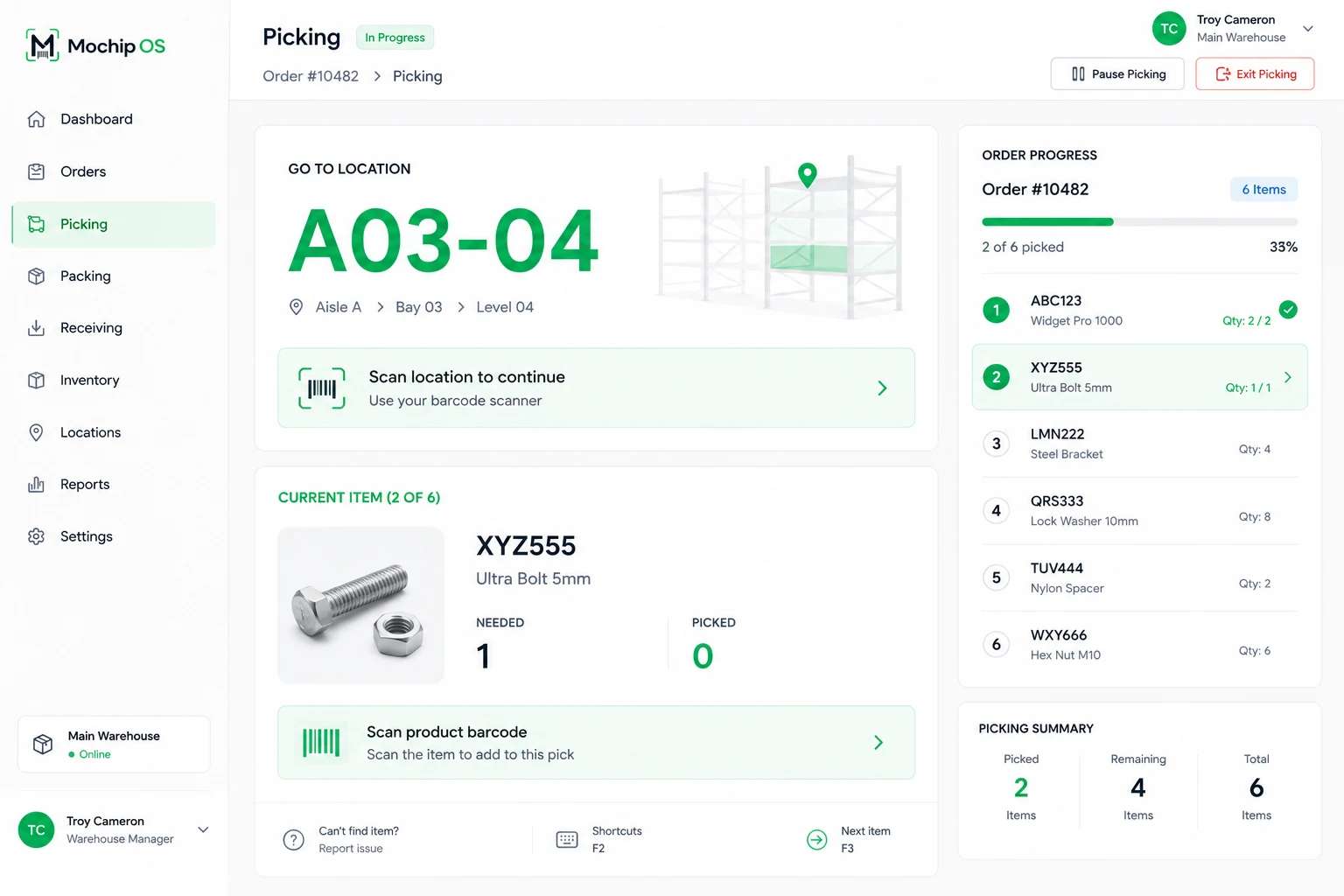
The Mochip OS picking screen. A large location code, A03-04, tells the operator where to go, with a prompt to scan the location to continue. Below it the current item is shown with the quantity needed and picked, and a prompt to scan the product barcode. A panel on the right lists the six items in order 10482 and marks two of them complete.
PickingScan the location. Scan the product. Confirm.
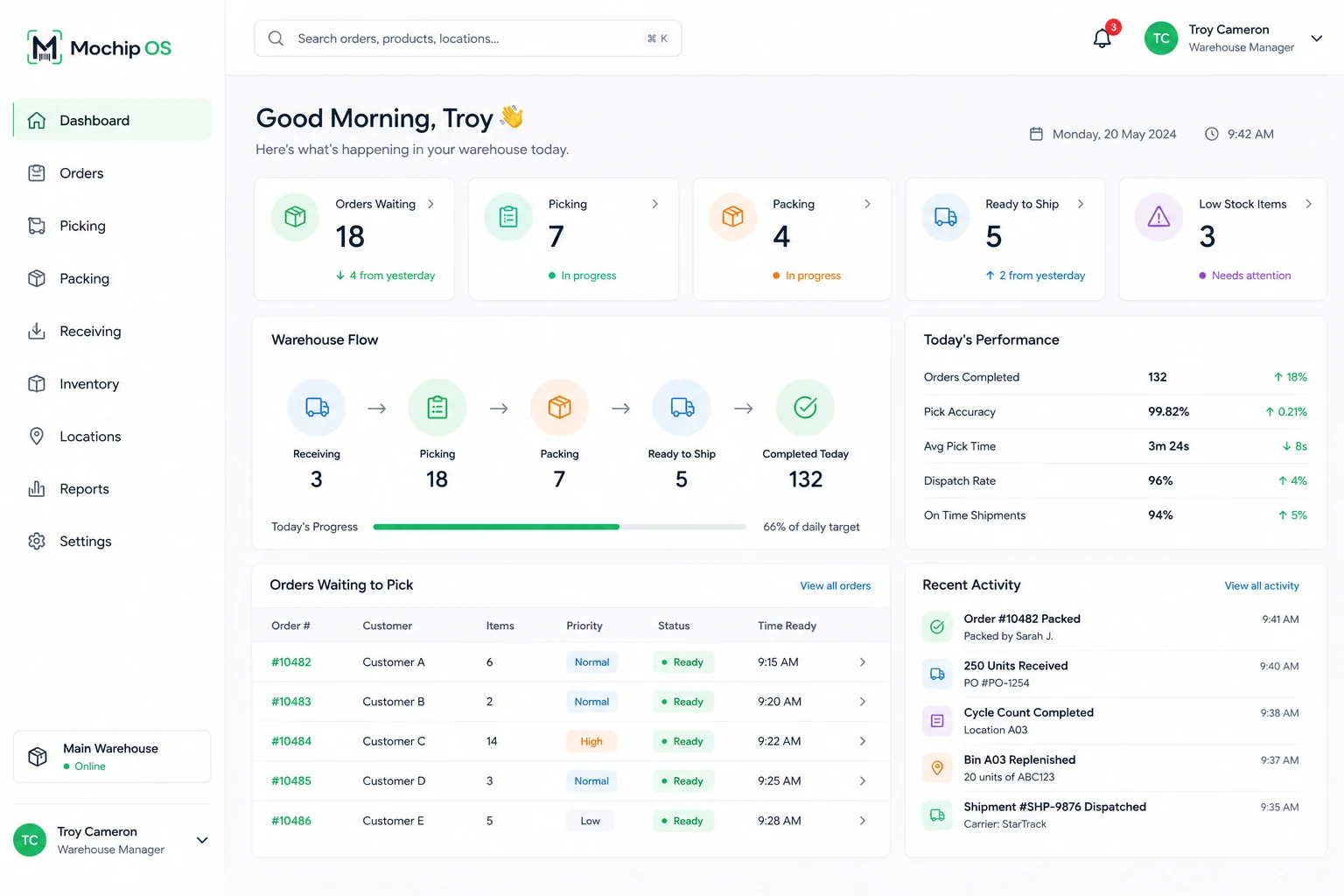
The Mochip OS dashboard. Counters across the top show orders waiting, picking, packing, ready to ship and low stock items. A warehouse flow strip traces receiving through to completed. Panels below list the orders waiting to pick and a feed of recent activity.
DashboardThe day’s work, in one view.
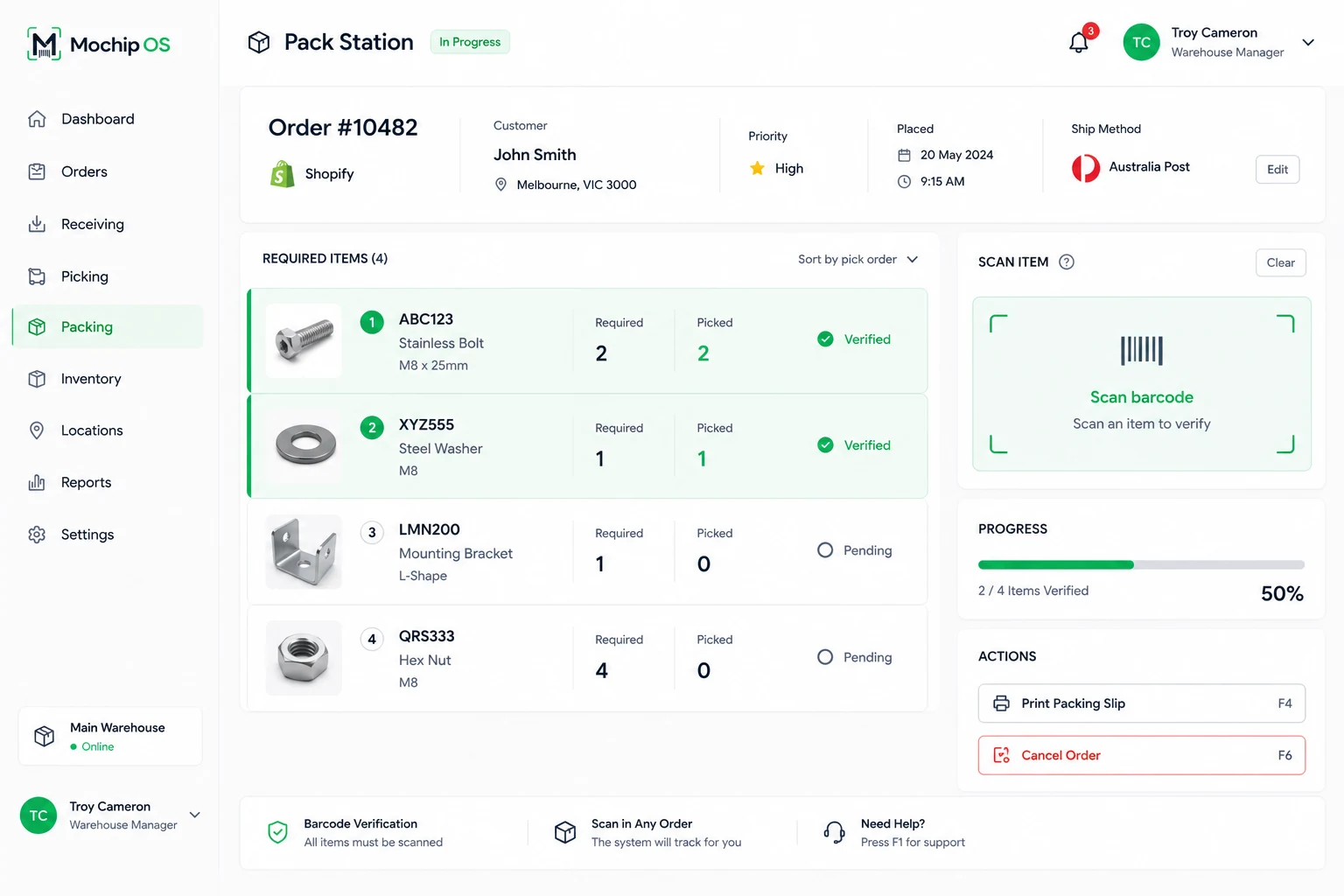
The Mochip OS pack station. An order header shows the customer, priority and ship method. The required items are listed with quantities required and picked, the first two marked verified and the rest pending, beside a panel prompting the operator to scan an item to verify it.
PackingEvery item scanned against the order.
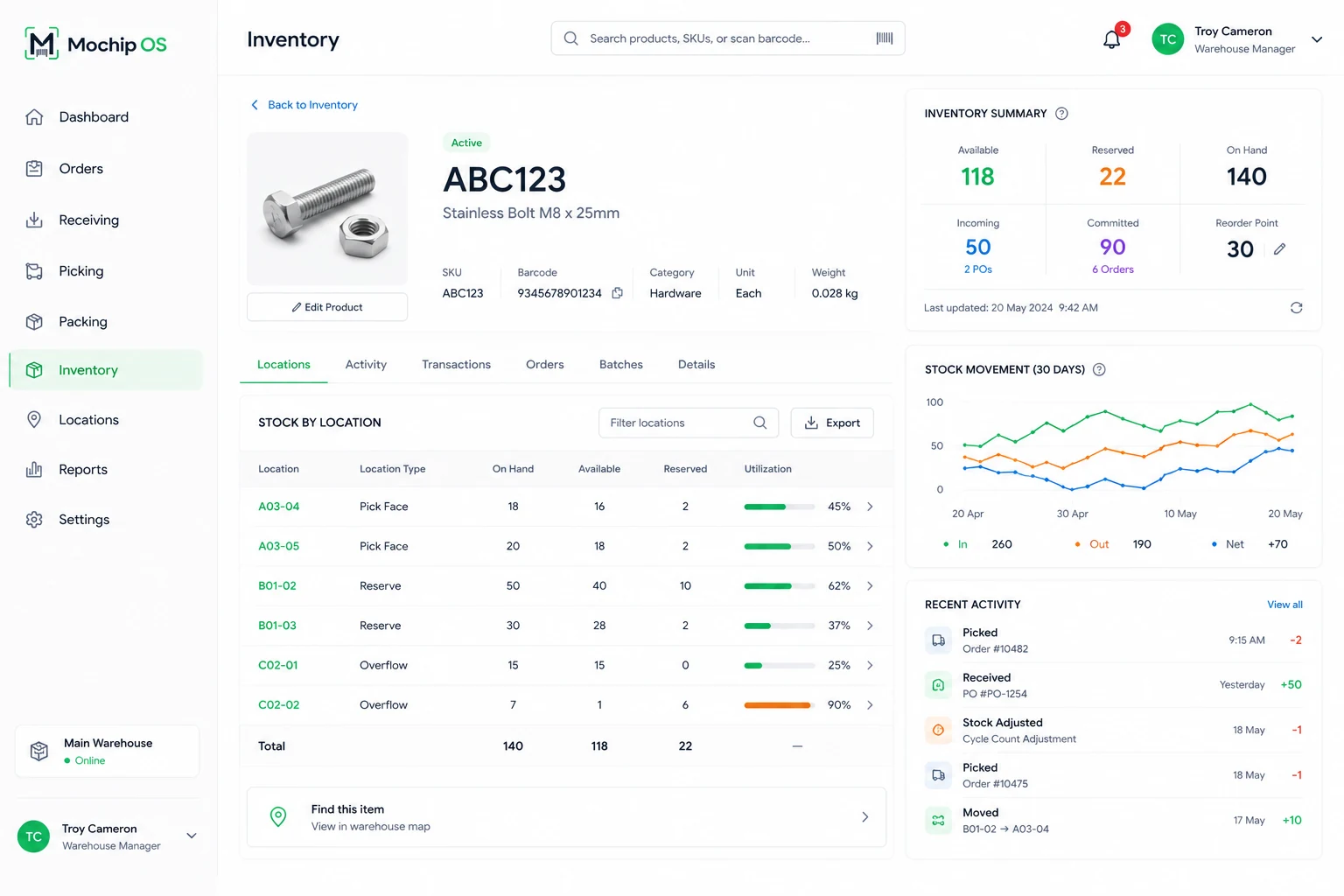
A Mochip OS product record for SKU ABC123. A summary panel shows available, reserved and on hand quantities alongside incoming and committed stock. A table breaks the stock down by warehouse location with utilisation bars, beside a thirty day stock movement chart and a feed of recent activity.
InventoryStock by location, and the movement behind it.
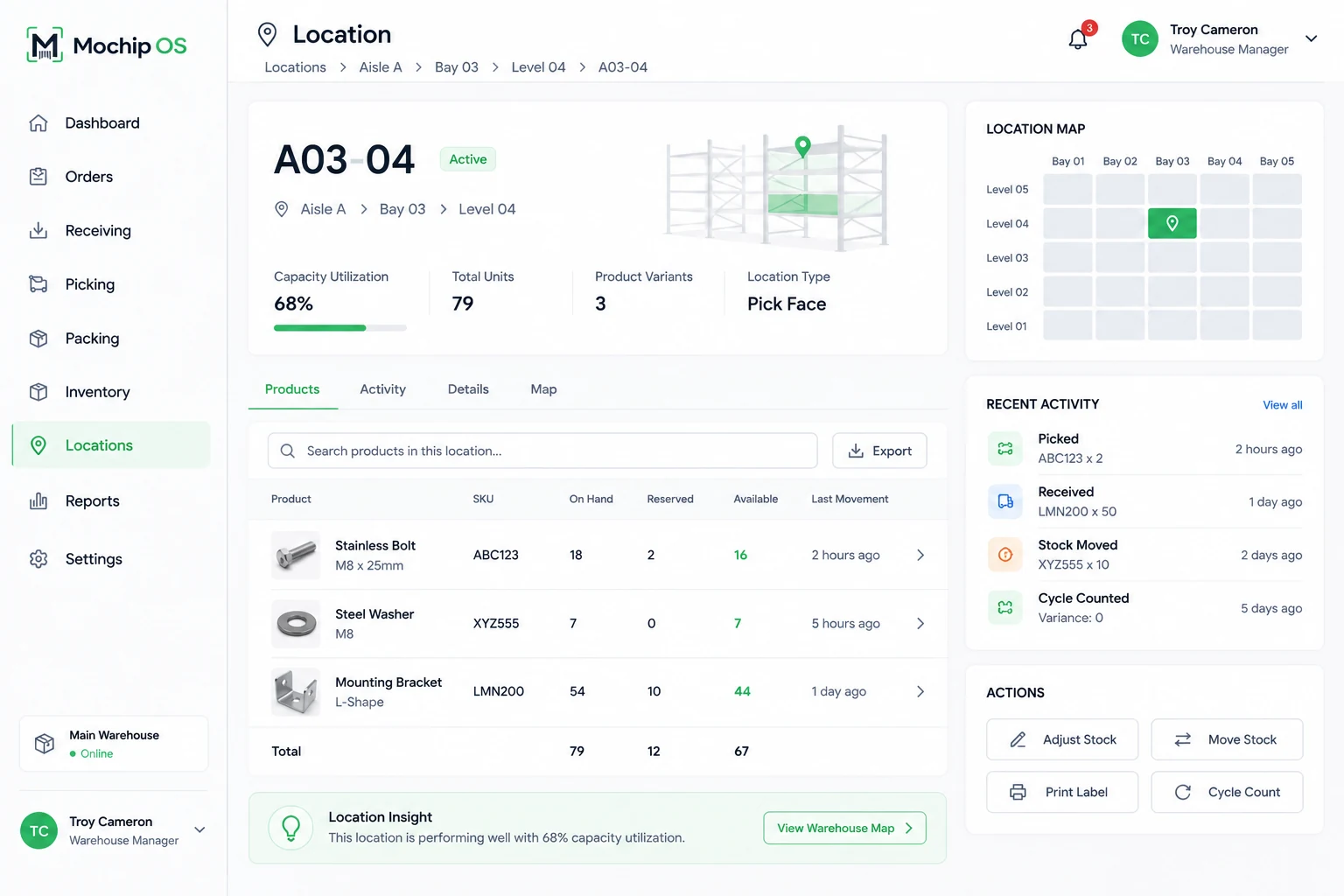
A Mochip OS location record for A03-04. It shows capacity utilisation, total units and location type, with a diagram of the bay and a grid map of the surrounding aisle. A table lists the products held in that location with their on hand, reserved and available quantities.
LocationsWhat is in the bay, and how full it is.

Model

What would this be worth in your building?

Put your own numbers in. Mochip Labs supplies none of them — the improvement percentages are yours to set, and the full arithmetic is printed underneath.

Your operation

$
%
$

Your assumptions

You set these

These are the only levers that decide whether the model returns a big number or a small one, so we have left them entirely to you. Set them to what you believe a structured, barcode-first workflow is worth in your operation — or set them to zero and see what the model says then.

%
%
%
How the model works — every step of it
  1. Orders per month = orders per week × 4.33
  2. Handling hours now = orders per month × minutes per order ÷ 60
  3. Handling value = handling hours now × your time-reduction % × labour cost per hour
  4. Wrong orders now = orders per month × your error rate
  5. Wrong-order value = wrong orders now × your error-reduction % × cost per wrong order
  6. Counting value = counting hours × your counting-reduction % × labour cost per hour
  7. Hours returned = handling hours saved + counting hours saved
  8. Per year = (handling + wrong-order + counting value) × 12

Deliberately excluded: software cost, implementation effort, hardware, and any benefit we cannot derive from a number you typed in. A real business case needs all four, and that is a conversation rather than a slider.

Platform

The stack behind the sequence.

The sequence is the short version. Underneath it, the movements usually split across scanners, spreadsheets and what somebody remembers sit in one operational record — without turning your operation into a heavyweight ERP project.

01

Inventory Control

Know what you have, where it is, and how it got there.

02

Barcode-First Workflows

Scan location. Scan product. Confirm the action.

03

Receiving & Putaway

Move incoming stock into controlled warehouse locations.

04

Picking & Packing

Guide fulfilment and verify the order before dispatch.

05

Stocktake & Cycle Counting

Keep physical stock and system stock aligned.

06

Dispatch & Traceability

Close out every order, with the movement history behind it when something needs investigating.

Mochip Labs

Mochip OS is the beginning.

Mochip Labs builds software for the physical side of operations — systems that bring the work of a building into one record. Warehousing came first because it is where the gap between what a business thinks it has and what it actually has is widest.

01

Mochip OS

Warehouse management

Building now
02

Layout

Warehouse layout planning

Exploring
03

Simulation

Test operational changes before making them

Exploring
04

Intelligence

Slotting, analytics and assisted planning

Future

Contact

See it runin your building.

Whether you’re moving beyond spreadsheets, outgrowing basic inventory tools, or simply want tighter control of warehouse operations, we’d like to understand how your warehouse works.

We use this only to reply to you. Nothing you typed into the model is sent unless you attached it. How we handle it.

Explore Mochip OS